
SEO Watcher
SEO Watcher is a powerful and easy-to-use Google Sheets™ add-on designed to automate on-page SEO audits. Tailored for SEO professionals, marketers, and web developers, it streamlines the process of checking critical SEO elements across multiple URLs directly within a familiar spreadsheet environment.
Download on Google Workspace
What It Does
SEO Watcher automates the execution of essential on-page SEO checks, helping users ensure that their web pages are properly optimized for search engines.
By minimizing manual work, it allows for quicker diagnostics and continuous SEO monitoring.
Why SEO Watcher?
The smart way to automate your SEO checks.
Automated SEO validation at scale
Run hundreds of SEO checks with a single spreadsheet — no coding required.
Save hours of manual QA
Forget repetitive copy-paste tasks. SEOWatcher monitors your critical tags, headers, redirects, and so on.
Catch issues before they impact your rankings
Broken canonicals? Missing meta tags? Bad redirects? We alert you before Google does.
Customizable to your exact needs
Choose what to check, how to check it, and what should trigger a warning — all through a simple spreadsheet interface.
Designed for SEOs and developers
Whether you’re on the SEO team or building the site, SEOWatcher helps you monitor quality over time.
Fits seamlessly into your existing workflow
No need to install anything or learn new tools — just use Google Sheets and let SEOWatcher handle the rest.
How It Works
1.
Create Your Spreadsheet
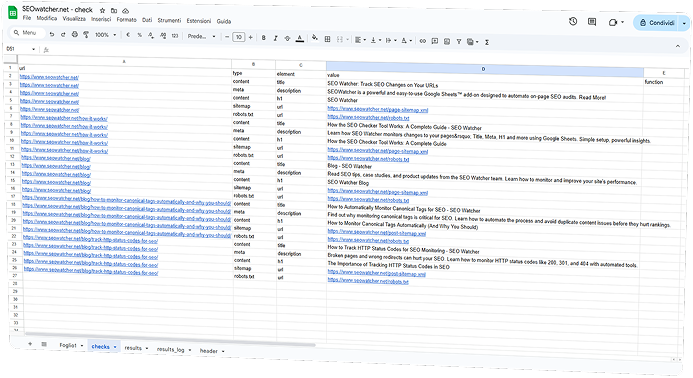
You start by creating a Google Sheet that defines the checks you want to run. Each row is a check, and each column specifies what to test
-
Define your URL.
-
Choose a check type (e.g. header, meta tag, content, redirect, sitemap, robots.txt).
-
Specify the element (like the header name, meta tag name, or CSS selector).
-
Add to expected value (what you want to find).
2.
SEO Watcher Runs the Checks
Once your spreadsheet is set up, SEO Watcher processes each row and performs the corresponding test by fetching the page, parsing the content, and validating the condition.
-
It checks if headers are set correctly.
-
It reads HTML content and matches it against your rules.
-
It analyzes sitemap and robots.txt files
3.
Get Clear, Actionable Results
SEO Watcher returns results in your spreadsheet (or sends alerts, if configured), showing which checks passed and which failed — so you can fix issues before they hurt your rankings.
-
✅ Pass = condition met.
-
❌ Fail = condition not met (you’ll know why).
-
📈 Track changes over time by re-running the same spreadsheet regularly.